



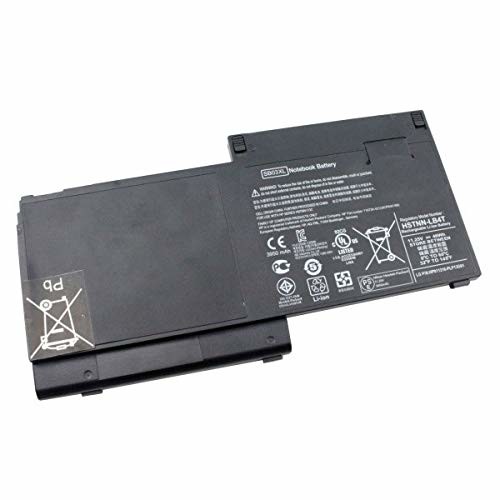
HP 820 Laptop Battery
HP 820 Battery

Compatible Models,
HP EliteBook 720 G1, HP EliteBook 720 G2, HP EliteBook 725 G2, HP EliteBook 725 G3, HP EliteBook 755 G3, HP EliteBook 820 G2, HP Elitebook 820, HP Elitebook 820 G1
About this item
【Specifications ]Battery Voltage: 11.1V. Capacity: 46Wh. Cells: 4-Cells. Battery life: Up to 500 recharge cycles over the life of the battery.
【Compatible Part Number】SB03XL SB03046XL HSTNN-LB4T HSTNN-I13C HSTNN-IB4T HSTNN-I13C 716726-421 716726-1C1 717378-001.
【Compatible the Models】Hp EliteBook 820 G1, HP EliteBook 720 G1, HP EliteBook 720 G2, HP EliteBook 725 G1, HP EliteBook 725 G2 E7U25AA E7U25UT F6B38PA
Compatible Computers: Hp EliteBook 820 G1, HP EliteBook 720 G1, HP EliteBook 720 G2, HP EliteBook 725 G1, HP EliteBook 725 G2 E7U25AA E7U25UT F6B38PA
Replace Battery List: SB03XL SB03046XL HSTNN-LB4T HSTNN-I13C HSTNN-IB4T HSTNN-I13C 716726-421 716726-1C1 717378-001
Grade A cells ensure fast charges and low power consumption; Built-in circuit protection ensures both safety and stability.
Each piece has been checked and tested before shipping.
OEM high-quality product. Hence, it perfectly replaces the original battery. Now, pay less for the same quality.
Security: certified by CE, FCC for safety, strict test for compatibility
The laptop battery fits inside the laptop without any difficulty if the compatibility has been correctly confirmed.
The laptop battery is made from the best materials available on the market. The safety of our customers is of utmost importance to us.
Quality and Certification: Our Batteries are original and meet CE/FCC/ROHS/UL certified standards.
They are brand-new, 100% OEM Compatible products from the Manufacturer and support up to 1000 recharge cycles
Built-in microchip, it can prevent over charging and lengthens the battery life.
The original Li-ion Battery guarantees a long battery life and high durability
Grade A cells ensure fast charges and low power consumption; Built-in circuit protection ensures both safety and stability.
Each piece has been checked and tested before shipping.
OEM high-quality product. Hence, it perfectly replaces the original battery. Now, pay less for the same quality.
Security: certified by CE, FCC for safety, strict test for compatibility
The laptop battery fits inside the laptop without any difficulty if the compatibility has been correctly confirmed.
The laptop battery is made from the best materials available on the market. The safety of our customers is of utmost importance to us.
Instruction for using Laptop battery
Firstly, you should not charge your laptop battery for longer than 24 hours.
Secondly, ensure that you are charging the battery always at room temperature.
Thirdly, use an original charger for the battery.
Fourthly, for first-time use, you should charge the battery for around 3 hours
Fifth, always remember not to put your battery near a source of heat. It can damage it.
Sixth, you should not expose your laptop battery to any liquids
Before placing your order, please refer to the picture and model number and compare them. This is because the products produced by different factories will have differences, such as size, cable length, interface, etc.
Compatible models (use "Ctrl+F to find your model quickly").
Built-in circuit protection ensures both safety and stability. Overcharger and Discharger Circuit Protection.
NB; For first use, please discharge the battery to 5% (not to 0%) and then charge to 95%, and cycle 3-4 times.
Powerful Performance
Genuine Quality Product
Condition; Brand New
Feedback; Your satisfaction is our first priority. If you receive the order and it is in good condition, we would be grateful if you would leave us 5-star Positive Feedback for the transaction.
Specifications
Key Features
HOW TO GET THE RIGHT BATTERY
Find the right laptop model, (Method 1):
Step 1: Press the key, ‘windows’ + ‘R’
Step 2: Type msinfo32, then click the button ‘ok’
Step 3: Check ‘System Model’ in the pop up window
Find the right battery model, (Method 2):
Step 1: Switch off the laptop and unplug the power cable
Step 2: Remove the back panel with the screwdriver. You should do this careful avoiding any harm to the laptop components.
Step 3: Disconnect the cable connected to the battery. Then you can check the part number or the model name on battery.
| Find the right laptop model, (Method 1) |
| Step 1 | Press the key, ‘windows’ + ‘R’ |
| Step 2 | Type msinfo32, then click the button ‘ok’ |
| Step 3 | Check ‘System Model’ in the pop up window |
| Find the right battery model, (Method 2) |
| Step 1 | Switch off the laptop and unplug the power cable |
| Step 2 | Remove the back panel with the screwdriver. You should do this careful avoiding any harm to the laptop components. |
| Step 3 | Disconnect the cable connected to the battery. Then you can check the part number or the model name on battery. |


